Fundraising
AI Data Rooms for Startup Fundraising
Connect approved diligence materials, investor access, identified engagement, relationship context, and human-reviewed follow-through in one fundraising workspace.
- Best for
- Founders, CEOs, Finance leaders, Chiefs of staff
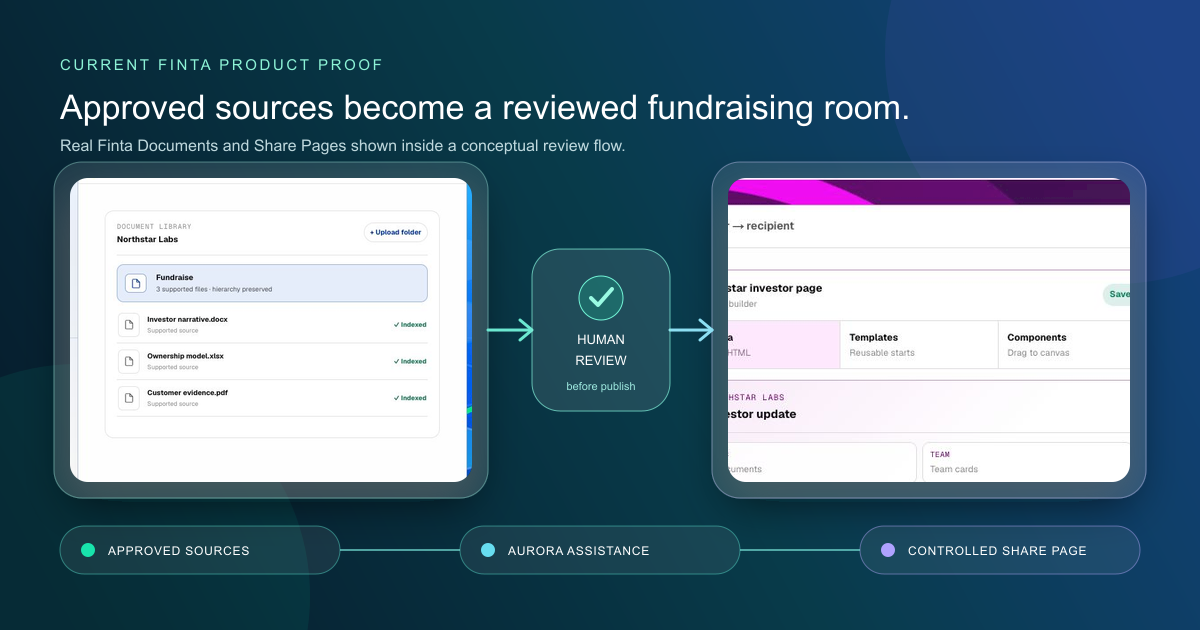
Finta helps a fundraising team keep its investor data room connected to the people, conversations, documents, and next actions around a raise. Use Documents to organize approved files, Share Pages to present them with an appropriate access setting, and Aurora to prepare supported work from the context available in the workspace. Identified page activity can return to the relevant relationship record so the team can decide what to do next.
This is a fundraising relationship workflow, not a certification that the room is complete or legally sufficient. Finta does not replace legal, accounting, tax, cap-table, fund-administration, subscription, e-signature, or specialist virtual data-room systems.
Who this is for
This solution is designed for founders, CEOs, finance leaders, and chiefs of staff running an active equity raise. It is especially useful when the same team must coordinate:
- an investor pipeline and relationship history;
- current diligence documents and approved versions;
- different access expectations at different stages;
- meeting preparation and open investor questions;
- follow-up that reflects the actual relationship, not only a page view.
If the primary requirement is granular file-by-file permissions, an NDA gate, formal Q&A, redaction, a full audit trail, or transaction-grade administration, evaluate a specialist virtual data room alongside Finta.
The source-to-follow-through loop
| Step | Team decision | Finta role |
|---|---|---|
| Prepare | Which materials are current, accurate, and approved? | Documents stores files and folder structure. Aurora can work with supported indexed files and available workspace context. |
| Present | What should this investor see now? | Share Pages combines approved documents, text, links, forms, deal terms, and other supported components. |
| Control access | Should the page be public, email-required, or email-verified? | The page owner chooses the supported access setting. Supported gated pages can also use dynamic watermarking and download controls. |
| Observe | What identified activity occurred? | Finta can associate supported page and document activity with a relationship record. Anonymous public visits remain anonymous. |
| Decide | Does this evidence change the next action? | Aurora can synthesize permitted context and prepare a draft or task. A person decides whether to act and approves consequential communication. |
| Record | What happened next? | CRM, tasks, meetings, and the fundraising pipeline preserve the reviewed outcome. |
The point is not to turn every view into outreach. It is to keep the room, the investor, and the fundraising decision in the same operating context.
Build the room from approved materials
Start with a diligence inventory, not a page design. Use Finta's documents to include in a data room for due diligence as the canonical general checklist, then adapt it to the actual investor request. The required material will vary by company, stage, investor, jurisdiction, and transaction.
Use the data-room completeness review to mark each requested item as present, missing, unverified, or not applicable. Record sharing approval separately. Legal and finance owners should decide what belongs in the room and which version is appropriate.
After the inventory is reviewed:
- Upload approved files or folders to Documents.
- Preserve a clear folder hierarchy and file naming convention.
- Create a Share Page from supported components, or ask Aurora to prepare custom HTML from your instructions and permitted source material.
- Review every claim, number, date, link, document, and access choice.
- Test the page as the intended visitor before sharing it.
Aurora can help prepare the room. It does not independently decide what confidential information may be disclosed.
Choose access deliberately
Finta supports public, email-required, and email-verified Share Pages. The right choice depends on what is being shared and with whom.
| Access | Practical fit | Important limitation |
|---|---|---|
| Public | Approved overview material intended for broad access | A visit may remain anonymous and the link may be forwarded. |
| Email-required | A visitor provides an email before access | A submitted email is an identity signal, not proof of authority or investment intent. |
| Email-verified | Access requires verification of the visitor's email | Verification confirms control of the email address, not the visitor's role, mandate, or permission to invest. |
For supported gated pages, page owners can configure dynamic watermarking, ZIP downloads, and investor-accreditation collection. These controls do not eliminate the need to classify information, verify recipients, or obtain professional advice.
Interpret engagement in relationship context
Identified page activity can include total session time, supported document previews or downloads, and submitted forms. Treat each event as context, not as a score or a conclusion.
A long session could mean close review, a distracted browser tab, or a technical delay. A download confirms a supported event, not agreement with the material. A form submission records what the visitor entered, not independent verification of the answer.
Before following up, review the data-room engagement workflow. Confirm identity, recent conversation, the investor's stage, open requests, sharing boundary, relationship owner, and whether a response was invited. Identified activity does not automatically send a reply. A separately configured automation can react to supported events, but its scope, stop conditions, and external actions still require deliberate setup and review.
Worked example: moving from partner meeting to diligence
A seed-stage company has completed a second meeting with a fund. The partner asks for financials, the cap table, customer references, and product-security material. The founder records the request and assigns legal and finance owners to review the files.
The team uses the completeness workflow to mark three files present, one missing, and one unverified pending counsel review. Legal and finance owners separately approve the appropriate versions for this investor. Approved files are added to Documents. Aurora prepares a draft Share Page outline from the approved instructions and supported files. The founder corrects a stale metric, removes an internal note, selects email-verified access, and tests the visitor experience.
The partner later opens the page and previews the financial model. Aurora can assemble the event with the prior meeting, the explicit request, and the open security question. It prepares a draft follow-up that answers the requested question. The founder checks the recipient, attachment, claims, and timing before sending. The page view alone did not trigger the message.
Human review boundaries
A person remains responsible for:
- deciding which documents may be disclosed;
- confirming each version, number, statement, and recipient;
- choosing the page access configuration;
- verifying legal, finance, tax, privacy, and security requirements;
- approving any external message or material change;
- recording whether a diligence request was actually resolved.
Aurora can inspect supported sources, summarize, organize, draft, and complete eligible workspace actions. Its output depends on the files, permissions, connections, tools, and context available at the time.
What this solution does not replace
- Legal, accounting, tax, or investment advice
- A cap-table or ownership system of record
- E-signature, subscription-document, KYC, AML, or payment processing
- Fund administration, capital calls, distributions, or investor reporting
- Transaction-grade M&A diligence and specialist VDR controls
- Independent verification of a document's accuracy or completeness
- Human approval of confidential disclosure and external communication
Put the room in the fundraising workflow
Use Create an Investor Data Room With AI to prepare one reviewed room, then connect it to the relationships and next actions in your raise. Explore Finta for fundraising.